The power of ‘root’ in Linux
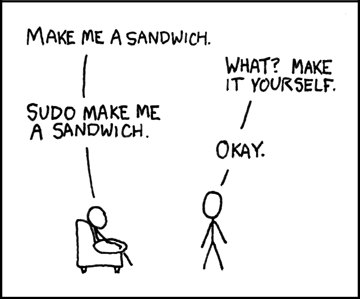
‘Root’ is the default name for system administrator in a *NIX system — a super user who can do anything and everything within the operating system.

After our previous recitation — Filesystem and File Organization in Linux — we hope the picture of the complete Linux file system would be resident in your minds. We are now equipped enough to try our hands on the beautiful operating system - Linux. But before we take you to the next stage, a very old saying boggled my mind - look before you leap!

The power of root in LinuxLet us go a little deep about the access privileges and rights which a root user has on a Linux system. Root is the default name for system administrator in a *NIX system - a super user who can do anything and everything within the operating system. As a result, root login should be used with special care. While working with a root login, we can end up doing a lot of harm to our system as well as the data, accidentally.

Need for the root account

Root login is required to perform actions which change the settings for all system-wide users or to modify the users’ accounts. We shall also have to use the root account for certain system operations.

Like,

  • To add new users to the system and administer the user data.
  • To install system-wide software.
  • To configure I/O devices like - a scanner or a TV tuner card, for example.
  • To configure system services like - a web or FTP server.

Is root really dangerous ? Why?

Yes, the main reason being security. One of the important rules of Linux operating system states that root account shall be used only in case when we are unable to perform an operation as a normal user. If you are logged in as a root, your system is much more vulnerable to the external attacks. For example, your favorite web browser may probably have a security loophole and if you happen to use it from the root account, you expose the whole operating system the world! If you work on the same web browser using an unprivileged account, it could only affect your personal configuration and data (if it is unencrypted). Here lies the difference.

How to use the root account safely and efficiently?

Ideally, one should avoid logging on to the root account via the GUI. Working continuously as root isn’t recommended for the reasons cited above. It is advisable to switch to the super user using the sudo command before another command (That’s with reference to Ubuntu Linux. This may vary from distro to distro.) This gives a temporary root access to the current user to run a single command, without having the need to actually log on as root. Using sudo command is said to be a little more secure than logging directly as root. Several distros enable sudo for the first user by default and disabling the direct root login via the GUI. Ubuntu is a prime example of this very approach.

This was all about the super user access privileges which we needed to know before we start to install applications and try them on our Linux installation. In our next article, we shall emphasize on how easy, fast and interesting it is to install a software application on a Linux distro. We’ll dig into all the possible ways of installing a software on Linux - the command line way to the modern GUI way!

Image courtesy: XKCD

Praval, the author of this article is available as a freelance writer and technology blogger. He writes reviews and stuffs related to Wordpress, Linux, Information marketing, Open Source Softwares, Life hacks and technology in general. He also provides information marketing solutions to his clients. You may reach him at Praval.com.


Don't like it? There are lots of published articles, pick a random one.

oCricket

Praval Singh posted this article on Wed, Jun 11th, 2008 at 5:16 am
Categorized under Linux, Technology and has the following tags

Suggest 1 or more tags for this article

Use a comma (,) to separate 2 or more tags.

[?]

Prev Article: Filesystem & file organization in Linux

Next Article: Software installation woes on Linux


Possibly Related Articles

Archives: Visit the Archives for more articles.

Comments Post Yours

There are one response so far. You can follow any responses to this entry through the RSS feed. You can leave a response, or trackback from your own site.

  1. Quite rightly said, I access more than 50 servers at work and can sudo into the account, this is for security reasons obviously and we are very much paranoid about using root access.

    To tighten security we have a single point access to internal servers rather than having everything on the open web, this is to ensure that we can tackle problematic usage by blocking out a single server rather than a bunch of it.

    Well there are different ways you can protect your core system and probably disabling root access to normal users is one of the best ones.

Post yours

Sidenotes

Quick notes, scribbles, somehow related to this website and to what I do. Or perhaps I'm just plain lazy to make them into a full article.

The rise and fall of Twitter

Superb, Awesome! Couldn't avoid having it here for people to enjoy. Via: TechCrunch. 9th Aug, 2008

Spawning does Django

Our team had a discussion yesterday why Spawning might be a good solution for our Python-Django specific Web server. The discussion is still hot on the table and have not come to a conclusion; nonetheless, ...2nd Aug, 2008

Take the A List Apart 2008 Survey

It's A List Apart's second annual survey for people who make websites. I took it! And so should you. The Survey for People Who Make Websites. This year's survey corrects many of last year's mistakes, with ...29th Jul, 2008

Django 1.0 alpha released

Django Project have released Django 1.0 Alpha today (22nd Jul, 2008 IST). If this is the timeline Django would stick to; then, Django 1.0 final release should hit the web on 2nd Sep, 2008. Alpha ...22nd Jul, 2008

The Continuum, a massive Flash Game

[flv:http://media.brajeshwar.com/v/games/the-continuum-trailer.flv 640 360] Watch The Continuum Trailer on YouTube Saw this at TechCrunch -- The Continuum: Flash Gaming Goes Hardcore. The Continuum is a new Flash game, featuring an extremely polished interface and deep ranking system. The ...12th Jul, 2008

View the Sidenotes Archive

Play the Penguin Game

Recommended

  • o! Just Me Of colorful cultures, entertainment, media, life hacks, music, books and movies from hollywood & bollywood.
  • AS 2.0 Reference Reference for ActionScript 2.0 Programming Language used in Flash. Primarily stashed here for my own personal reference.
  • My Special Job My Special Job is a place where you can look for your weird necessities, strangely superb employees, when your need are more of those hackers, geeks, and ultimate rockstars in the Internet Technology.
  • Ode to Apple Dedicated to Apple - Mac, iPhone, iPod, iTunes, Quicktime, Apple TV and all the awesome softwares for the Apple Mac.
  • Downloads All downloads, Free and Open Source.
  • Oinam The official conglomerate of the Oinam related companies, institutes and holdings.
  • Forum Oinam’s technical discussion forum where developers and designers can discuss all technical topics.

Download free Brajeshwar Wordpress Theme

Brajeshwar

Brajeshwar I firmly believe in keeping things simple, easy for users and I envison pushing the technical envelop time and again for the betterment of viable commercial and practical applications.

Want to know more about me?

Brajeshwar's affinity with Adobe

My Photos

More photos on Flickr

Member of 9rules Network

"Brajeshwar" has 843 Articles and 5,903 comments, contained within 20 categories and 1,167 tags.

This site is in operation since 11th June, 2001.